

Digital tools for small business have become increasingly important as entrepreneurs and small teams look for better ways to manage their daily work. Running a small business means wearing many hats.
One day you may be managing customers and answering emails. The next, you may be creating marketing materials, organizing projects, sending invoices, or trying to figure out why a task that should take ten minutes somehow took an hour.
Fortunately, there are digital tools designed to make many of these jobs easier.
The challenge is that there are now thousands of business software products to choose from. Some are simple and affordable. Others are packed with features that a small business may never use.
That creates an important question:
Which tools are actually worth considering?
This guide is not a list of the “10 best” software products, because there is no single tool that is best for every business.
Instead, we are looking at 10 important types of digital tools that small businesses should know about in 2026, along with examples of well-known platforms and the situations where each type of tool can make sense.
The goal is simple: understand the problem first, then choose the tool.

1. Digital Tools for Small Business: Productivity and Office Software
Every business needs a place to create documents, work with spreadsheets, manage email, and organize files.
A productivity suite can bring many of these everyday tasks together in one ecosystem.
Two of the most familiar options are Microsoft 365 and Google Workspace.
Microsoft 365 can be particularly attractive to businesses that already rely heavily on traditional Microsoft Office applications, while Google Workspace is built around cloud-based collaboration and browser-based productivity.
Neither approach is automatically better. The right choice depends largely on how your business already works and what your team needs. Current small-business comparisons continue to frame the decision around workflow, existing software, and collaboration needs.
What to consider
Before choosing a productivity suite, look at:
- The applications included
- Cloud storage
- Collaboration features
- Email and calendar functionality
- Compatibility with your existing systems
- Number of users
- Total monthly or annual cost
MegaBizHub tip: Don’t choose a productivity suite because it has the longest feature list. Choose the one that fits the way your business actually works.
2. Task and Project Management
As a business grows, keeping everything in your head—or scattered across notebooks and emails—becomes increasingly difficult.
Task and project management tools help businesses organize work, deadlines, responsibilities, and progress.
Examples include Trello, Asana, and monday.com. These platforms continue to appear among the common project and task-management options for small businesses.
Who can benefit?
These tools can be particularly useful for:
- Freelancers
- Small teams
- Agencies
- Service businesses
- Businesses managing multiple projects
What to consider
A sophisticated project-management platform can be useful for a growing team, but it may be unnecessary for a solo business with a relatively simple workflow.
MegaBizHub tip: Start with the simplest system that solves your problem. Add complexity only when your business actually needs it.
3. Team Communication and Collaboration
Email remains an essential business tool, but it is not always the best way to handle quick conversations between team members.
Platforms such as Slack and Microsoft Teams can organize internal communication into channels, conversations, meetings, and shared workspaces.
They can also connect with other business applications, allowing information to move between different parts of a company’s workflow.
Who can benefit?
Communication platforms can be especially useful for businesses with:
- Remote employees
- Multiple departments
- Distributed teams
- Frequent internal collaboration
What to consider
More communication does not automatically mean better communication.
If every small issue becomes an instant message or notification, employees can end up spending more time responding to messages than doing productive work.
MegaBizHub tip: Establish simple communication rules. Not every message needs an immediate response.

4. Cloud Storage and File Management
Important business documents should not exist in only one place.
Cloud-storage services make it possible to access files from different devices, collaborate with other people, and maintain versions of documents.
Common options include Google Drive, Microsoft OneDrive, and Dropbox.
Who can benefit?
Almost any business that works with digital documents can benefit from organized cloud storage.
What to consider
Look at:
- Available storage
- File-sharing options
- Version history
- Security features
- User permissions
- Integration with other software
MegaBizHub tip: Cloud storage is not the same thing as a complete backup strategy. Critical business information should still have appropriate backups.
5. Customer Relationship Management (CRM)
Once a business begins dealing with more customers and prospects, spreadsheets and scattered notes can become difficult to manage.
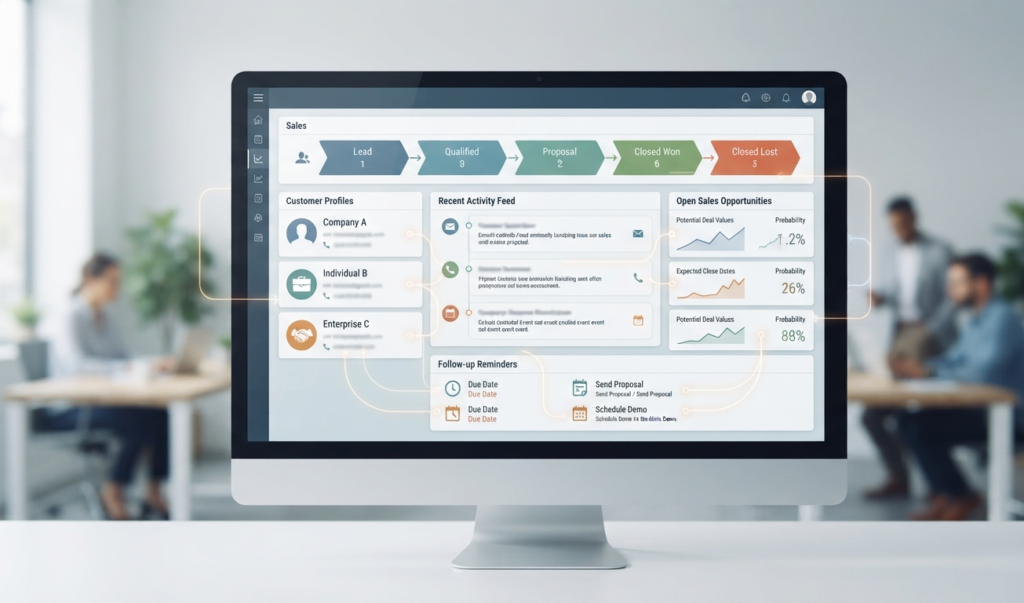
A Customer Relationship Management (CRM) system can bring customer information, sales opportunities, communication history, and follow-up activities into one place.
Examples include HubSpot CRM and Zoho CRM, both of which are commonly positioned for small-business use.
Who can benefit?
CRM software can be especially useful for businesses that:
- Generate leads
- Have sales pipelines
- Follow up with prospects
- Manage recurring customers
- Need a central customer database
What to consider
Not every business needs a sophisticated CRM.
A freelancer with a handful of long-term clients has very different requirements from a company managing hundreds of leads.
MegaBizHub tip: Your CRM should simplify your sales process—not force you to create a complicated process just because the software allows it.
6. Email Marketing
Email marketing remains a practical way for businesses to communicate with customers and prospects.
Platforms such as Mailchimp can help businesses create campaigns, manage subscriber lists, and track performance.
Who can benefit?
Email marketing can be useful for:
- Online stores
- Service businesses
- Content websites
- Consultants
- Local businesses
- Businesses that want to maintain long-term customer relationships
What to consider
Before building an email list, determine:
- Who should receive your messages
- What information you will provide
- How frequently you will send emails
- How subscribers will opt in
- Which results you want to measure
MegaBizHub tip: A smaller list of genuinely interested subscribers can be more valuable than a huge list of people who never open your emails.
7. Design and Content Creation
Small businesses often need graphics for websites, social media, presentations, advertisements, and other marketing materials.
Professional design software can be powerful, but it can also have a steep learning curve.
Tools such as Canva have made visual content creation much more accessible to non-designers. Canva also integrates with other business and collaboration platforms, including Slack, Asana, Microsoft Teams, Salesforce, and Google Workspace.
If you’re interested in AI-powered visual content, you can also read our InstaDoodle Review 2026.
Who can benefit?
This type of tool can be useful for:
- Entrepreneurs
- Freelancers
- Small marketing teams
- Online businesses
- Businesses managing their own social media
Templates can make design easier, but they do not replace a clear marketing message.
MegaBizHub tip: A design tool can help you create something attractive. Your business strategy still determines what you should actually say.
8. Business Automation
Many businesses perform the same repetitive tasks every day.
For example:
- Moving information between applications
- Creating notifications
- Updating spreadsheets
- Sending follow-up messages
- Creating records
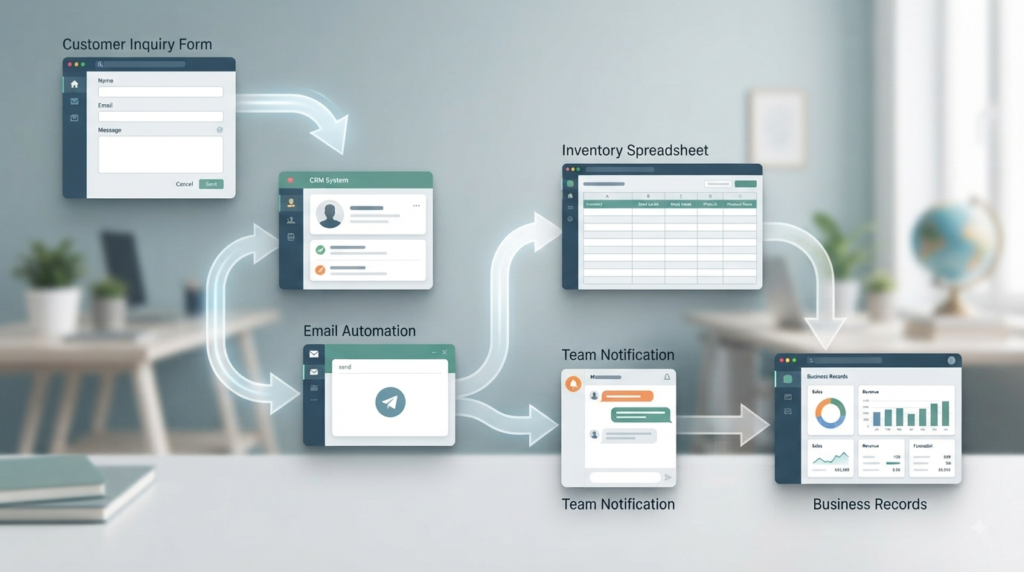
- Connecting forms to other business systems
Automation platforms can connect different applications and trigger actions automatically.
Zapier is one of the best-known examples. Its integrations can connect business applications and automate workflows between them.
Who can benefit?
Automation becomes particularly valuable when a business has repetitive processes involving multiple applications.
What to consider
Automation should begin with a well-understood process.
If a process is poorly designed, automating it simply allows the same mistakes to happen faster.
MegaBizHub tip: First understand the workflow. Then decide what should be automated.
9. Accounting and Invoicing
Financial management is one area where organization matters from day one.
Accounting and invoicing software can help businesses track income, expenses, invoices, payments, and financial records.
Examples include QuickBooks, FreshBooks, and Wave, all of which continue to appear among small-business accounting and invoicing options.
Who can benefit?
This type of software can be useful for:
- Freelancers
- Contractors
- Service businesses
- Online businesses
- Small companies with employees
What to consider
Financial and tax requirements vary by location and business structure.
Software can help organize financial information, but it does not automatically replace professional accounting or tax advice.
MegaBizHub tip: Choose financial software based on your actual accounting needs, your business structure, and the requirements you have to meet.
10. Artificial Intelligence Tools
Artificial intelligence has become an increasingly important part of modern business software. If you’re exploring AI solutions for your business, take a look at our AI Invisible Review 2026 for another perspective on AI-powered business tools.
AI can assist with tasks such as:
- Brainstorming
- Writing and editing
- Research
- Summarizing information
- Content creation
- Data analysis
- Customer support
- Workflow automation
AI is also becoming integrated directly into tools businesses already use. For example, Anthropic’s 2026 small-business offering connects Claude with applications including QuickBooks, PayPal, HubSpot, Canva, DocuSign, Google Workspace, and Microsoft 365.
For businesses interested in AI-powered customer communication, our Bizzy ClientFlow AI Kit Review 2026 looks at another specialized AI solution.
Who can benefit?
Almost any business can find potential uses for AI, particularly when employees regularly work with information, communication, content, or repetitive tasks.
What to consider
AI tools should be evaluated for:
- Accuracy
- Privacy
- Data handling
- Cost
- Integration
- Human oversight
The fact that a tool uses AI does not automatically make it the right solution.
MegaBizHub tip: Use AI to increase human capability—not as an excuse to remove human judgment from important decisions.
Do You Really Need All 10
Probably not.
This may be the most important point in the entire guide.
A small business does not need ten different subscriptions simply because ten categories of software exist.
A solo entrepreneur might need only a productivity suite, cloud storage, accounting software, and perhaps one specialized tool.
A growing team may need project management, CRM, communication, marketing, and automation tools as well.
The right technology stack depends on the business.
Choosing digital tools for small business should always begin with the problem you are trying to solve.
Instead of asking:
“Which tools should I have?”
Start by asking:
“What problem am I trying to solve?”
That question usually leads to a much better purchasing decision.

Final Thoughts
Digital tools can help small businesses become more organized, communicate more effectively, reduce repetitive work, and make better use of their time.
The right digital tools for small business can improve efficiency without adding unnecessary complexity.
But technology should serve the business—not the other way around.
Before purchasing a new software product, consider the problem it is supposed to solve, how often you will use it, whether your team will actually adopt it, and whether the cost makes sense for your business.
You don’t need the biggest software stack.
You need the right software stack.
At MegaBizHub, we’ll continue exploring digital tools, reviewing individual products, comparing alternatives, and creating practical guides to help small businesses make more informed technology decisions.
The best tool isn’t necessarily the one with the most features. It’s the one that solves the right problem.
Leave a Reply